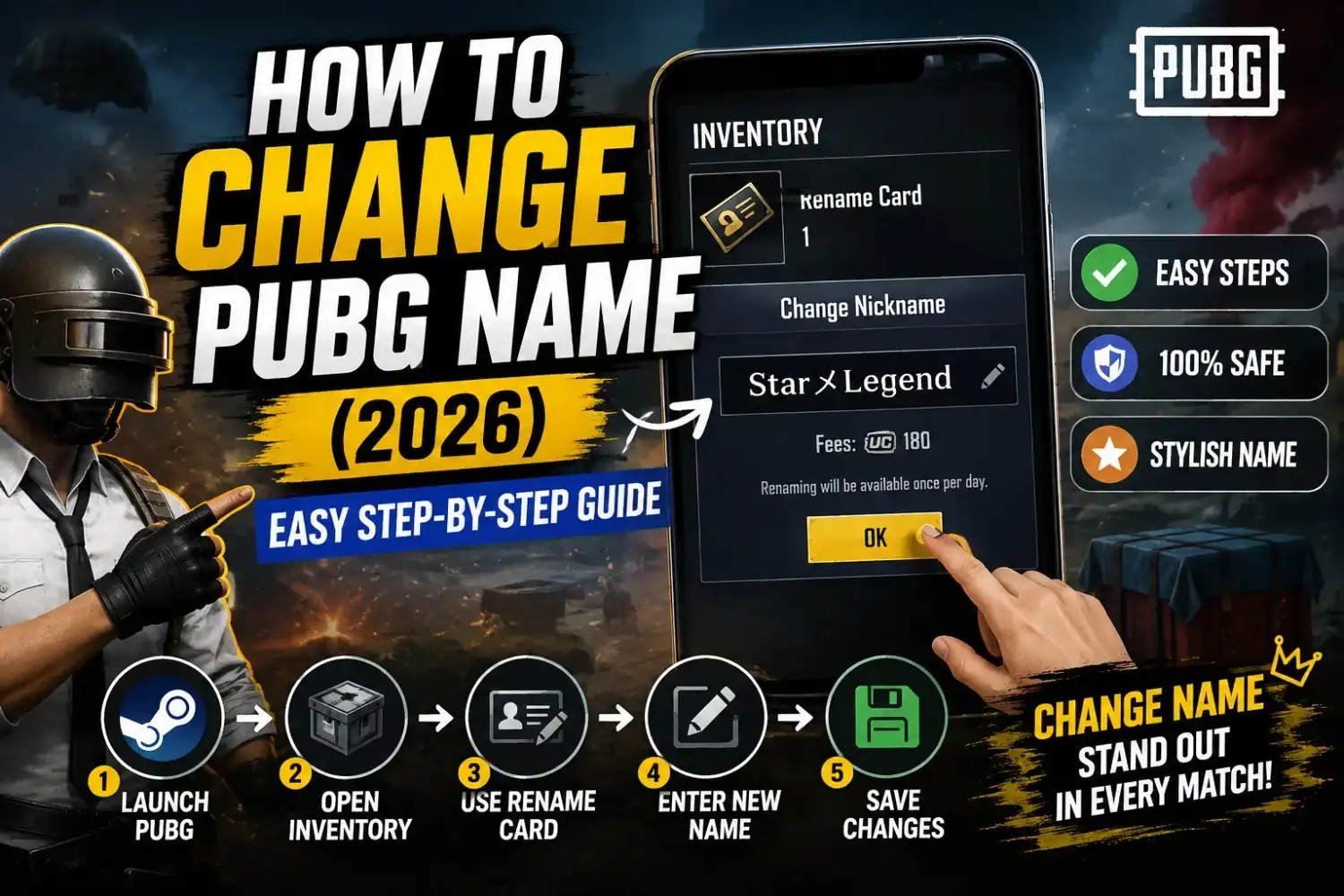
How to Change PUBG Name (2026) – Easy Step-by-Step Guide
Want to change your PUBG name but aren’t sure where to start? Whether you’re using PUBG Mobile, BGMI, PUBG: BATTLEGROUNDS on Steam, or playing on a console, the process is simple once you know where to find the Rename Card and what rules to follow. This guide walks you through every step so you can update your nickname without confusion.
You’ll also learn how to change your PUBG name to a stylish nickname, what to do if your preferred name is already taken, whether it’s possible to change your name without a Rename Card, and the current character and symbol rules.
If you haven’t chosen a new nickname yet, you can create one using our PUBG Name Generator or add unique PUBG symbols and stylish fonts before making the change. By the end of this guide, you’ll know exactly how to update your PUBG name on mobile, PC, Steam, and supported consoles quickly and correctly.
How to Change PUBG Name on PUBG Mobile
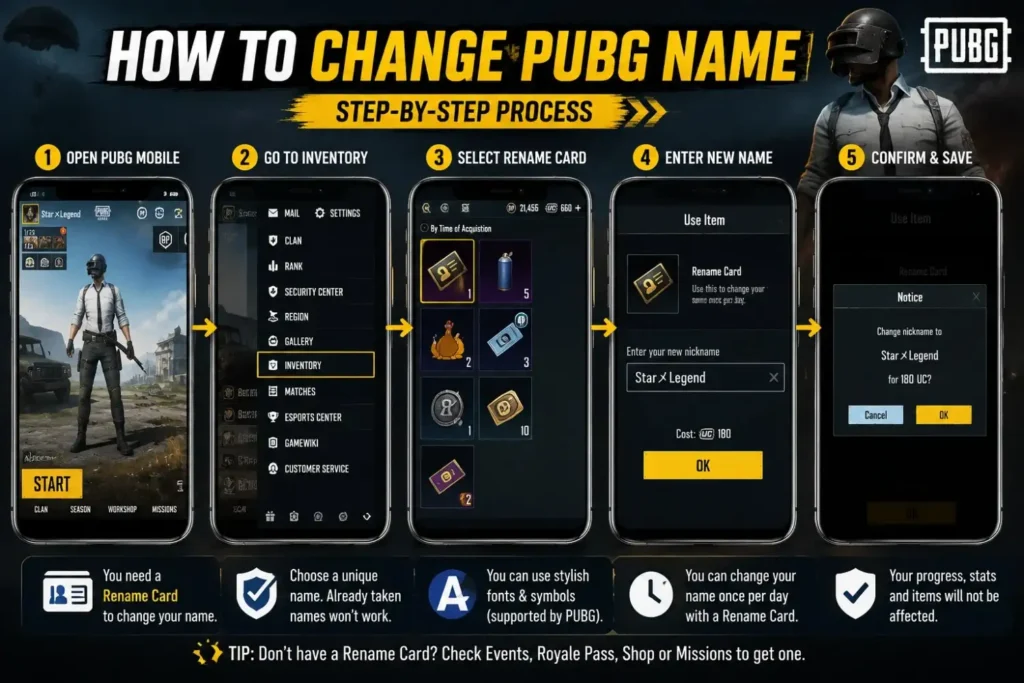
Changing your PUBG Mobile nickname is quick if you already have a Rename Card. Follow these simple steps to update your name without losing your account progress.
Open PUBG Mobile
Launch PUBG Mobile on your phone and sign in to the account where you want to change your nickname.
Go to Inventory
From the game lobby, tap your Inventory. This is where your Rename Card and other items are stored.
Select Rename Card
Find the Rename Card inside your inventory and tap it to open the rename option.
Tap Use
Press the Use button. A text box will appear where you can enter your new PUBG nickname.
Enter Your New Name
Type or paste your new nickname. You can also use stylish fonts or supported PUBG symbols if you want a unique gamer name.
Confirm Changes
Preview your new nickname and tap OK or Confirm. Your PUBG name will update immediately if it meets the game rules.
💡 Helpful Tip
Before using your Rename Card, make sure your new nickname is available and follows PUBG’s character limit. If you want a unique name, create one with a PUBG Name Generator and add supported PUBG symbols before saving your changes.
What You Need Before Changing Your PUBG Name
Before you change your PUBG name, make sure everything is ready. Having the right items and knowing the game rules will help you change your nickname quickly without any errors.
Rename Card
A Rename Card is required to change your PUBG nickname. If you don’t have one, you’ll need to get it from the shop, events, or rewards before you can update your name.
Internet Connection
Use a stable internet connection before changing your name. This helps prevent errors while saving your new nickname.
Account Login
Sign in to the correct PUBG, BGMI, or Steam account before using your Rename Card. Make sure you are editing the right game profile.
New Nickname Ready
Choose your new PUBG name before opening the Rename Card. This saves time and reduces the chance of making mistakes.
Character Limit
Keep your nickname within PUBG’s allowed character limit. Remember that letters, numbers, spaces, and symbols all count as characters.
Supported Symbols
Only use symbols and stylish fonts that PUBG supports. Popular Unicode symbols usually work better than uncommon characters.
✅ Quick Checklist
- ✔ Have a Rename Card ready.
- ✔ Choose your new nickname before editing.
- ✔ Check that your name follows PUBG’s character limit.
- ✔ Use supported Unicode symbols and stylish fonts.
- ✔ Make sure your internet connection is stable.
- ✔ Log in to the correct PUBG, BGMI, or Steam account.
How to Change PUBG Name on PUBG PC (Steam)
If you play PUBG: BATTLEGROUNDS on Steam, you can change your in-game nickname using a Rename Item when it is available. Follow these simple steps to update your PUBG name on PC.
Launch Steam
Open the Steam client on your computer and sign in to the account that owns PUBG: BATTLEGROUNDS.
Open PUBG
Start PUBG: BATTLEGROUNDS from your Steam Library and wait for the game lobby to load completely.
Open Inventory
Go to your inventory and look for a Rename Item or any available name change item in your account.
Rename Item
Select the Rename Item, enter your new PUBG nickname, and check that it follows the game’s naming rules.
Save Changes
Review your new nickname and confirm the change. Your updated PUBG name will appear once the rename process is complete.
💡 Important Note
PUBG PC and PUBG Mobile use different systems for changing nicknames. Features and rename items may change with future game updates. Before using a Rename Item, prepare your new nickname and make sure it follows the current character limit and supported symbol rules.
Can You Change PUBG Name Without a Rename Card?
Many players search for ways to change their PUBG name without using a Rename Card. The answer is simple: in most cases, you need a Rename Card. However, there are a few situations where you may receive one for free through official PUBG events or rewards.
Official Answer
You can change your PUBG nickname anytime without a Rename Card.
✅ Reality
In normal gameplay, PUBG requires a Rename Card before you can change your nickname.
Exceptions
There is a secret method to rename your account for free.
✅ Reality
There is no official unlimited free rename option. Only PUBG promotions or special events may offer free Rename Cards.
New Accounts
Every new account can change its name whenever it wants.
✅ Reality
Some new accounts receive beginner rewards, but free name changes are not guaranteed for every player.
Events
PUBG never gives away Rename Cards.
✅ Reality
Seasonal events, Royale Pass rewards, and special promotions sometimes include a free Rename Card.
Free Rewards
You must always buy a Rename Card with UC.
✅ Reality
You can sometimes earn Rename Cards through official missions, login rewards, or limited-time PUBG events.
💡 Quick Answer
- ✅ A Rename Card is required for most PUBG name changes.
- ✅ Free Rename Cards are sometimes available during official events.
- ✅ Avoid websites or apps claiming unlimited free name changes—they are not official.
- ✅ Check PUBG announcements and in-game events for legitimate Rename Card rewards.
How to Get a PUBG Rename Card
A Rename Card lets you change your PUBG nickname. If you don’t have one yet, there are several official ways to get it. Here are the most common methods used by PUBG Mobile and BGMI players.
Royale Pass
Some Royale Pass seasons include a Rename Card as a reward. Check the current pass rewards to see if one is available.
Events
PUBG frequently runs limited-time events that reward players with a free Rename Card after completing event tasks.
Shop
Visit the in-game Shop to see if a Rename Card is available for purchase using the game’s official currency.
Missions
Complete special missions or seasonal challenges. Some missions offer a Rename Card as part of the reward pool.
Rewards
Login rewards, anniversary celebrations, and official PUBG campaigns may include free Rename Cards for active players.
UC Purchase
If you need a Rename Card immediately, you can buy one with UC when it is available in the official PUBG store.
✅ Best Ways to Get a Rename Card
- ✔ Check every new PUBG event for free rewards.
- ✔ Review your current Royale Pass rewards.
- ✔ Complete seasonal missions and challenges.
- ✔ Visit the in-game Shop regularly.
- ✔ Purchase one with UC if you need to change your nickname right away.
How to Change PUBG Name to a Stylish Name
Want your PUBG nickname to look more unique? You can easily change a normal name into a stylish one by using fancy fonts, supported Unicode symbols, and a PUBG name generator. Follow these simple steps before using your Rename Card.
Copy a Stylish Name
Choose a stylish PUBG nickname with fonts and symbols that you like, then copy it to your clipboard.
Use a Name Generator
Create a unique nickname instantly with a PUBG Name Generator. It helps you generate stylish names that are ready to copy.
Paste Your Name
Open your Rename Card and paste the copied nickname into the name box instead of typing it manually.
Preview
Check how your new PUBG name looks. Make sure all fonts and symbols display correctly before confirming.
Save Changes
Tap the confirmation button to save your stylish PUBG nickname. Your new name will appear immediately after the change is complete.
Create Your Stylish PUBG Name in Seconds
Need a unique nickname? Use our free PUBG Name Generator to create stylish names with cool fonts, symbols, and ready-to-copy designs for PUBG Mobile and BGMI.
🎮 Create Stylish PUBG NameCommon Problems When Changing PUBG Name
Sometimes your PUBG nickname may not change even after using a Rename Card. Here are the most common problems players face and the easiest ways to fix them.
Make sure you have a Rename Card in your inventory. If it is missing, restart the game and check your rewards, Shop, or Events section. If you recently received the item, it may take a few minutes to appear.
If another player already uses your preferred nickname, PUBG will not allow it. Try adding numbers, symbols, or stylish fonts to create a unique name.
Some Unicode characters and symbols are not supported. Remove unsupported characters and use common PUBG-compatible symbols instead.
Check your internet connection and try again. If the problem continues, restart PUBG and make sure your nickname follows the game’s naming rules.
Server maintenance or temporary issues can prevent name changes. Wait a few minutes and try again after the servers are stable.
If you recently changed your nickname, PUBG may require you to wait before using another Rename Card. Check your account for any cooldown period.
💡 Quick Tips
- ✔ Make sure your Rename Card is available.
- ✔ Use only supported Unicode symbols.
- ✔ Check your internet connection before saving.
- ✔ Create a unique nickname if your first choice is unavailable.
- ✔ Wait until server maintenance is complete before trying again.
Conclusion
Changing your PUBG name is quick when you know the right steps. Make sure you have a Rename Card, choose a name that follows PUBG’s rules, and check your new nickname before you save it. If your favorite name is already taken, try adding a stylish font or a few supported symbols to make it unique.
If you want a nickname that stands out, use a trusted PUBG Name Generator instead of copying random names from social media. It helps you create names that are easier to read, look better in matches, and are ready to copy with one click. You can also explore our collections of PUBG Symbols, Stylish Names for Boys, and Stylish Names for Girls to find more ideas.
We keep this guide updated whenever PUBG changes its rename process or naming rules, so you can always follow the latest method with confidence. Whether you play PUBG Mobile, BGMI, or PUBG: BATTLEGROUNDS on Steam, this guide gives you the steps you need to change your name safely without affecting your account progress.
Frequently Asked Questions
Still have questions about changing your PUBG name? Here are the answers to the questions players ask most often.
Open PUBG, go to your Inventory, select your Rename Card, tap Use, enter your new nickname, and confirm the change. Your updated name will appear once the process is complete.
Sometimes, yes. PUBG occasionally gives free Rename Cards through official events, missions, or rewards. If you do not have one, you may need to purchase a Rename Card using the official in-game store.
For most players, yes. A Rename Card is required to change your PUBG nickname under the normal game rules.
Yes. PUBG: BATTLEGROUNDS on Steam allows nickname changes through the game’s official rename system when a Rename Item is available.
Yes, but only if the characters are supported by PUBG. Always preview your nickname before saving to make sure it displays correctly.
Yes. Many Unicode symbols work in PUBG, but not every symbol is supported. Use commonly accepted symbols for the best results.
Common reasons include not having a Rename Card, using unsupported characters, choosing a name that is already taken, or temporary server issues.
You can change your nickname multiple times as long as you have a Rename Card and follow any waiting period required by the game.
Yes. BGMI uses a very similar rename process. You normally need a Rename Card, then enter your new nickname and confirm the change.
Yes. Changing your nickname only updates your display name. Your account progress, rank, inventory, achievements, and purchases remain unchanged.